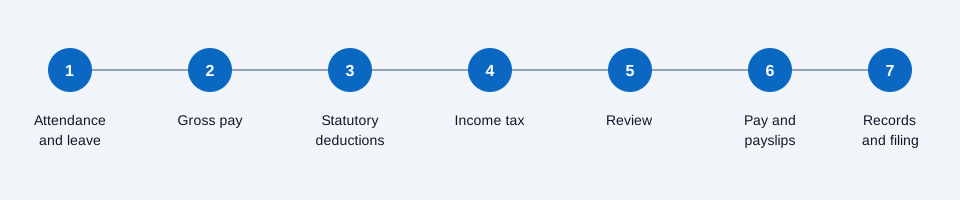
To run payroll in Pakistan, you collect attendance and leave, work out gross pay, apply statutory deductions and salary tax, review the result, pay staff and issue payslips. Each step depends on the one before it, so an error early on repeats all the way to the payslip.
This guide walks through the seven steps in order. It does not list EOBI, PESSI or FBR rates, because they change with each notification and Finance Act. Check the current figures with the official bodies before every run.
Step 1: Collect attendance and leave
Close the month's attendance first. You need the days each person worked, the leave they took and which leave was paid or unpaid. If attendance comes from a machine, a register and chat messages, merge them into one record before you do anything else.
Step 2: Work out gross pay
Start from each employee's basic salary and add fixed allowances. Then adjust for unpaid days, overtime and any bonus.
A simple worked example: an employee earns PKR 60,000 a month and your policy divides the monthly salary by 30 days. One day is worth PKR 2,000. Two unpaid days reduce gross pay by PKR 4,000. Use the divisor in your own policy and apply it the same way for everyone.
Step 3: Apply statutory deductions
Apply the social security and old-age contributions that apply to each employee:
- EOBI for eligible employees
- PESSI for staff working in Punjab
- SESSI for staff working in Sindh
The province on the employee record decides which provincial body applies, so keep it correct. Our EOBI and PESSI compliance checklist lists what to check each month.
Step 4: Calculate income tax on salary
Salary income tax follows the FBR salary slabs for the fiscal year. Work out the tax for the month from the employee's taxable salary and the slab that applies. Update your sheet or system when a new Finance Act changes the slabs.
Step 5: Review before you confirm
Compare this month with last month. Look at anyone whose net pay changed a lot, new joiners, leavers and anyone with unpaid leave. A short review catches most errors before staff see them. Our guide to common payroll errors in Pakistan shows the usual ones.
Step 6: Pay staff and issue payslips
Pay by your usual method and give every employee a payslip that shows gross pay, each deduction and net pay. A self-service portal lets staff open their own payslip instead of waiting for HR to send it.
Step 7: Keep records and file on time
Keep the payroll run, the payslips and the deduction records together for each month. Make the EOBI, PESSI or SESSI and tax payments and filings by their due dates. Missed deadlines are where compliance problems start.
Five signs manual payroll is costing you days
If your process is a monthly Excel sheet, these signs mean it is taking more time than it should:
- Attendance lives in one place and payroll in another. Someone retypes hours into the salary sheet, and every transfer is a place for a typo.
- EOBI and PESSI are recalculated from scratch each month. The work should be done once, when the employee is set up.
- Leave balances sit in a different file from payroll. Reconciling the two before payday takes time and causes disputes.
- Payslips go out one by one by email or chat. That is hours of repeated work every month.
- One correction means re-running the calculation. In a spreadsheet, a single missed day can force you to redo large parts by hand.
These are not five problems. They are one chain: attendance feeds leave, leave feeds payroll, payroll feeds deductions, and deductions feed the payslip. When that chain sits in one system, most of the stitching disappears. The hidden cost of this work is covered in the real cost of running payroll in Excel.
When to move from Excel to payroll software
Move when the monthly run depends on one person's file, when attendance is retyped, or when you cannot show who changed what. WF Engine payroll software runs these seven steps from one set of records and handles EOBI, PESSI and FBR deductions in the run. Bring last month's salary sheet to a 20-minute demo and we will show how it would run.
Adnan Khan
HR Lead, Bitsbuffer
Adnan leads HR operations and business development for Workflow Engine. He writes about Pakistani HR compliance, payroll, and workflow automation from direct operational experience.